
AI Agents Freelancers 2026 Budget
Hiring an AI agent developer typically runs between $30 and $150 per hour on platforms like Upwork, depending on the project's scope and the developer's experience. This wide range reflects the tradeoff between raw coding speed and strategic architecture. A junior developer might build a basic script quickly, but you often pay a premium for someone who can design an agent that handles edge cases and integrates cleanly with your existing tools.
Quality depends heavily on your own ability to refine the output. As noted in recent 2026 automation playbooks, AI agents can generate a solid first draft that you can refine in minutes rather than writing from scratch. This means your budget isn't just for the coder; it's also for the time you spend guiding the agent's logic. If you skip this refinement step, you may end up paying more later to fix broken workflows.
To see what tools are available for building or managing these agents, consider the current market offerings. The following products represent common starting points for freelancers and small teams looking to automate tasks without hiring a full-time engineer.


As an Amazon Associate, we may earn from qualifying purchases.
Compare the strongest AI agents for freelancers 2026 options
The freelance landscape in 2026 is no longer just about who can write the fastest or code the cleanest. It is about who can orchestrate AI agents most effectively. We have shortlisted the top tools that actually handle autonomous tasks, from client outreach to code generation, rather than just offering basic chat interfaces.
The following comparison table breaks down the strongest AI agents for freelancers 2026 options. We focused on practical utility: how much work these tools actually remove from your plate and where they still require your human oversight.
| Agent | Best For | Autonomy Level | Price Range |
|---|---|---|---|
| Jasper AI | Content & Copywriting | Medium | $49+/mo |
| DevOps Agent (GitHub Copilot Workspace) | Coding & Debugging | High | $19+/mo |
| Relevance AI | Business Automation | Very High | Custom |
| Notion AI | Project Management | Low-Medium | $10+/mo |
Jasper remains the go-to for writers who need to scale output without sacrificing brand voice. It integrates well with existing workflows, allowing you to generate first drafts that you can refine in minutes. It does not replace the writer; it removes the blank-page paralysis.
For developers, GitHub Copilot Workspace represents a significant leap. It does not just suggest lines of code; it can plan and execute multi-step tasks across your repository. This is a high-autonomy agent that requires careful review but drastically reduces boilerplate work.
Relevance AI targets the operational side of freelancing. It is designed to build custom agents that can handle customer support, data entry, and lead qualification. This is the closest we have come to a "digital employee" that runs in the background while you focus on client strategy.
Notion AI is essential for freelancers who live in their project management tools. It helps summarize meeting notes, draft project briefs, and organize tasks. Its autonomy is lower, but its integration with your daily workflow makes it indispensable for staying organized.


As an Amazon Associate, we may earn from qualifying purchases.
Choosing the right agent depends on your bottleneck. If you are drowning in content, Jasper is your answer. If your code reviews are taking too long, look at Copilot Workspace. For those looking to scale their business operations, Relevance AI offers the most robust automation capabilities.
Inspect the expensive parts
AI agents are powerful, but they are also expensive to break. A single misconfigured autonomous agent can burn through your API budget or send incorrect client deliverables in minutes. Before you hand over control, you must audit the infrastructure that keeps these agents grounded.
Think of your agent setup like a high-performance engine. You don’t just throw fuel in and hope for the best; you check the belts, the sensors, and the safety valves. Here is where the money leaks.

Autonomous agents can hallucinate confidently. Check that your system prompts include strict output schemas (JSON or specific text formats) and length limits. Without these, an agent might generate a 5,000-word report when you needed a 200-word email, wasting tokens and time. Test this by asking for overly complex outputs and verifying the agent stops at the boundary.

AI agents often loop. A simple error in logic can cause an agent to retry a failed action hundreds of times, racking up bills before you notice. Inspect your agent’s error-handling logic. Set hard caps on maximum iterations and monitor your API provider’s dashboard for unusual spikes in token usage. Most providers allow you to set daily spending limits—enable them immediately.

Never let an agent make final financial or public-facing decisions without a checkpoint. Inspect the handoff points where the agent transitions from "thinking" to "acting." Ensure there is a clear, interruptible step where you review the output. If the agent tries to send an email or make a purchase automatically, pause the flow and verify the approval mechanism works as intended.
Agents often need access to your emails, calendars, or customer databases. Inspect the permissions you’ve granted. Use the principle of least privilege: give the agent access only to the specific folders or APIs it needs, not your entire account. If an agent is compromised, limited scope prevents a total data breach. Regularly review these permissions and revoke access when projects end.
By checking these four areas, you protect your budget and your reputation. AI agents save time, but only if they are built with safety and cost controls in mind.
Ownership Costs
A cheap tool is only cheap if it stays cheap. When you bring an AI agent into your freelance workflow, the initial price tag is just the entry fee. The real expense shows up in the hidden layers: API calls, maintenance, and the time you spend keeping the system from drifting off course.
Think of an AI agent like a rental car. The daily rate looks great, but you still pay for gas, insurance, and the valet fee. If you drive it off-road or ignore the warning lights, those costs multiply quickly. Similarly, an AI agent might cost $20 a month, but if it burns through credits every time it generates a draft or makes a mistake, your monthly bill spikes without warning.
Maintenance and Drift
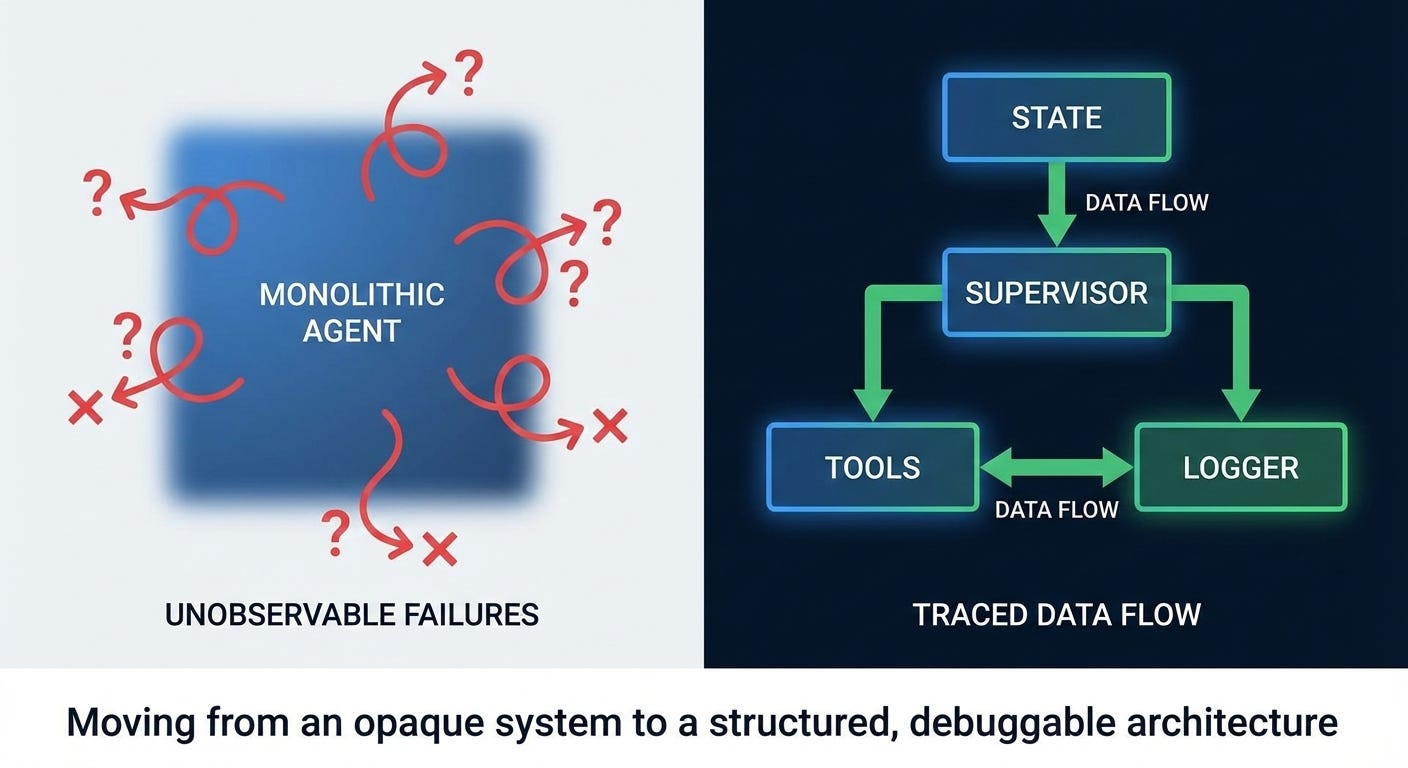
AI models aren't static. They change, APIs break, and workflows that worked last month might fail today. You need to budget time for "tune-ups"—checking that the agent is still pulling the right data, interpreting prompts correctly, and not hallucinating facts. Without regular checks, a cheap agent becomes a liability, wasting your time instead of saving it.
When to Walk Away
If you find yourself spending more than 30 minutes a week fixing or monitoring your AI tool, it's time to reassess. At that point, the tool is costing you more in labor than it saves. A simple, manual process might be faster and cheaper than a complex, high-maintenance automation.

As an Amazon Associate, we may earn from qualifying purchases.
The goal isn't to avoid AI agents, but to choose ones that fit your actual capacity. If you can't afford the maintenance, you can't afford the agent.
Ai agents for freelancers 2026: what to check next
Here are the practical answers to common concerns about using AI agents in the gig economy.
How much does it cost to hire an AI agent developer?
Hiring a developer to build custom AI agents typically costs between $30 and $150 per hour on platforms like Upwork, depending on your project's scope and the developer's experience. For solo freelancers, using off-the-shelf tools is usually more affordable than building custom solutions from scratch.
Can AI agents actually save me time on admin tasks?
Yes. Freelancers often lose a third of their week to administrative work. AI agents can handle scheduling, invoicing, and initial client communication, allowing you to focus on billable work. The best tools are those that integrate directly with your existing workflow rather than requiring you to learn a new system.
Are AI-generated drafts safe to use for client work?
AI agents can generate solid first drafts that you refine in minutes, but quality depends heavily on your review. Never submit raw AI output. Use the agent for structure and ideation, then add your unique voice and expertise. This hybrid approach maintains quality while boosting productivity.
What skills will be most valuable when AI agents are common?
As AI handles routine tasks, skills like prompt engineering, project management, and creative strategy become more valuable. Freelancers who can effectively direct AI agents and curate their output will have a significant advantage over those who try to compete on speed alone.
No comments yet. Be the first to share your thoughts!